

This post is Part 1 of a 4-part series on modernizing Master-Strike.com which is based on vue 2 and javascript (instead of vue 3 and TypeScript). Layout the foundation for a modern Vue 3 frontend.
Modernizing master‑strike.com starts long before any UI components are written. The foundation of the project is a clean repository, a predictable directory structure, and a development environment that supports fast iteration and long‑term maintainability.
This article documents how the Master Strike modernization effort establishes its repository, structures the project, and configures a practical development environment using GitHub and Visual Studio Code. The goal is to create a setup that is easy to understand today and scalable as the application grows into a fully modern Vue 3 single‑page application.
Background
Master-strike.com was created by Bageltop Games (wants to remain anonymous) and Kabalistus (Edson Mesquita). Card images where scanned by CaptainMetroidica (Corey Mease) and hosted on his site https://legendarycardgame.com see Ultimate Legendary Gamer card below.
Also, Images are hosted on digitaloceanspaces.com under the Bageltop Games account. Example card image of Wolverine - https://nyc3.digitaloceanspaces.com/bageltop/CardImages/Heroes/wolverine-04.png


Repository Setup and Development Environment
Establishing the Repository
The first step is creating a new repository on GitHub to serve as the authoritative source for the modernized frontend application. This repository contains all application code, configuration files, documentation, and deployment workflows.
Because the application is ultimately deployed as a static single‑page application (SPA), the repository is intentionally frontend‑only. Backend services, data pipelines, and hosting concerns are treated as external dependencies rather than embedded directly into the codebase.
Recommended repository characteristics include:
- A clear, descriptive repository name (for example,
modern-master-strike) - Public visibility to encourage transparency and learning
- A concise
README.mdexplaining the project purpose and technology stack - A
.gitignoreconfigured for Node.js and frontend tooling
Once created, the repository is cloned locally and opened in Visual Studio Code, which serves as the primary development environment.
Creating the GitHub Repository
The project begins by creating a new repository on github.com, which will serve as the single source of truth for the modernized frontend.
Recommended repository settings:
- Repository name:
master-strike-modern - Visibility: Public
- Initialize without a README (Vite will generate one)
- No license selected initially
Once the repository is created, open Visual Studio Code and use its integrated terminal for all remaining steps.
The first step is creating a new repository on github.com to house the modernized frontend application. This repository becomes the single source of truth for the project, containing application code, configuration, documentation, and deployment workflows.
The repository should be initialized as a frontend-only project, with no backend concerns. The application will ultimately be deployed as a static single‑page application (SPA), so the repository structure reflects that goal.
Recommended repository settings:
- Public repository (to encourage transparency and reuse)
- A short, descriptive name (for example:
master-strike-modern) - A clear README explaining the project’s purpose and technology stack
- A
.gitignoreconfigured for Node.js projects
Once created, the repository is cloned locally and opened in Visual Studio Code, which serves as the primary development environment.
By combining a clean repository structure, a consistent editor experience, and a small set of focused VS Code extensions, the Master Strike modernization effort begins with a development environment optimized for clarity, iteration, and long‑term sustainability.
- GitHub serves as the single source of truth for code and documentation
- VS Code provides a consistent and extensible development experience
- GitLens improves historical awareness and refactoring confidence
- Live Server supports rapid prototyping and static layout testing
With this foundation in place, the project is well positioned to move into build tooling, TypeScript integration, and Vue 3 component development.
Visual Studio Code as the Development Environment
Visual Studio Code (VS Code) is used as the primary development environment for the modernized Master Strike application due to its strong ecosystem and first‑class support for modern frontend tooling. VS Code provides an approachable editor for daily development while scaling well as the project grows in complexity.
At a minimum, the following VS Code capabilities are leveraged:
- Native Git integration for commits and branch management
- TypeScript language services for static typing and refactoring
- Vue Single‑File Component (
.vue) support - Tailwind CSS IntelliSense for utility class discovery
In addition to these core capabilities, a small number of carefully chosen extensions are used to improve developer productivity and code understanding without adding unnecessary complexity.
GitLens: Git Awareness Directly in the Editor
GitLens is used to enhance VS Code’s built‑in Git features by surfacing repository history and code authorship directly within the editor. As the Master Strike codebase evolves, GitLens provides valuable context about how and why specific lines of code were introduced or modified.
GitLens is particularly useful during modernization work, where understanding legacy decisions and incremental refactors is important. Rather than switching to the terminal or GitHub web interface, GitLens allows that context to remain close to the code itself.
Key benefits of GitLens in this project include:
- Inline and hover‑based Git blame annotations showing who last modified a line of code and when
- Quick access to commit messages and file history for any section of code
- Improved confidence when refactoring, reviewing changes, or documenting architectural decisions
GitLens supports the project’s goal of transparency and maintainability by making repository history easy to explore as part of normal development work.
Live Server: Lightweight Static Development Server
During early prototyping and static layout work, the Live Server VS Code extension is used to quickly serve HTML, CSS, and JavaScript files from a local development server. Live Server provides automatic browser refresh on file save, enabling rapid iteration without manual reloads.
Live Server is especially useful for:
- Static layout and design experiments
- Print layout testing using
@media printand@pagerules - Early dashboard and HTML prototype development
While the project ultimately relies on Vite’s development server for the Vue 3 single‑page application, Live Server remains a helpful tool for lightweight experiments and learning exercises that do not require a full build pipeline.
As the project transitions fully into the Vite‑based SPA workflow, Live Server usage naturally decreases, but it remains a valuable part of the development toolkit during foundational stages.
Project Initialization with Vite
With the repository open in VS Code, the project is initialized using Vite, which scaffolds the application and provides the dev server and build pipeline.
Vite creates a minimal but production‑ready structure that supports:
- Vue 3
- TypeScript
- Hot module reloading
- Optimized production builds
At this stage, the project can already be started locally, giving immediate feedback that the development environment is functioning correctly.
Ideal Directory Structure
A clean directory structure is essential for scalability and readability. One important architectural decision in this project is not storing the Master Strike card data locally as JSON files. Instead, the application consumes data directly from the @master-strike/data package at runtime.
The recommended structure reflects that choice:
master-strike-modern/
├── node_modules/ (dependencies created when running npm install and excluded in .gitignore)
│   └── ???
├── public/
│   └── favicon.svg
│   └── CardImages/ (.webp)
│   │   └── Bystandards/
│   │   └── General Cards/
│   │   └── (folders Henchman/ Heroes/ Masterminds/ Promos/ Schemes/ Villains/ Wounds/)
├── src/
│   ├── assets/
│   │   └── styles.css
│   ├── components/
│   │   ├── CardList.vue
│   │   ├── CardItem.vue
│   │   └── SearchBar.vue
│   ├── views/
│   │   ├── HomeView.vue
│   │   └── CardDetailView.vue
│   ├── services/
│   │   └── cardSearch.ts
│   ├── types/
│   │   └── card.ts
│   ├── App.vue
│   └── main.ts
│   └── style.css
├── index.html
├── package.json
├── tsconfig.json
├── tsconfig.node.json
├── tailwind.config.js
├── vite.config.ts
├── README.md
└── .gitignore
└── .vscode
Key principles behind this structure:
Key structural decisions
src/services/
This is where all interaction with@master-strike/dataoccurs. The package is treated as a dependency, not as a data source that needs to be copied or managed locally.- No
data/directory
There is intentionally no folder containing card JSON files. The data lives inside the installed npm package and is accessed through a service layer. src/types/
TypeScript interfaces and types are defined here to describe the shape of the data returned by the search engine, keeping type definitions centralized and reusable.- Clear separation of concerns
UI components never import data directly. They rely on services, which keeps the UI decoupled from the data source and makes future changes easier.
This structure avoids duplication, reduces maintenance overhead, and keeps the application aligned with modern frontend best practices.
Why there is no
data/folderThis project does not store the Master Strike card data as local JSON files.
The card data is provided by the
@master-strike/datanpm package, which already includes:
- the complete dataset
- the search engine
- versioned updates maintained by the package author
Copying that data into the repository would introduce unnecessary duplication, increase the risk of stale or inconsistent data, and add an ongoing maintenance burden.
Instead, the application treats
@master-strike/dataas a runtime dependency and accesses it through a dedicated service layer. This keeps the repository focused on application logic and UI, while allowing data updates to flow naturally through standard npm upgrades.A local
data/directory would only be appropriate if the project intentionally exported a static snapshot for offline use or experimentation—neither of which is required for this modernization effort.
Note on the dist/ directory
The dist/ folder is intentionally omitted from the repository structure shown above. It is generated by Vite only when running a production build (npm run build) and contains compiled, optimized assets. Because it is derived output and not source code, it is excluded from version control and recreated as needed during deployment.
You should think of dist/ as belonging to deployment, not development.
Lifecycle view
Source code (GitHub)
        ↓
   npm run build
        ↓
     dist/ (generated)
        ↓
Cloudflare Pages hosting
Cloudflare Pages:
- runs the build
- reads from
dist/ - serves it globally
You never manually maintain that folder.
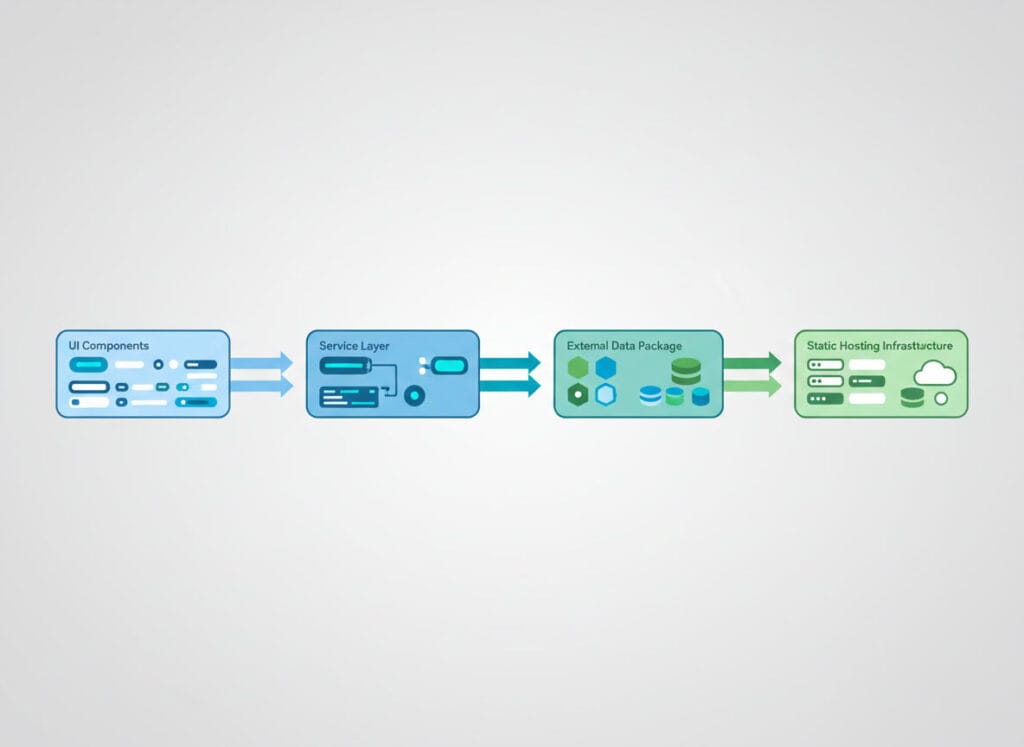
Architectural Overview (Diagram Description)
The modernized master‑strike application follows a clear, layered frontend architecture designed to keep responsibilities well separated.
At the top layer, Vue 3 UI components render the user interface. These components are responsible only for presentation and user interaction. They never access data directly.
Below the UI, a service layer acts as the boundary between the application and external dependencies. This layer encapsulates all interaction with the @master-strike/data package, exposing simple, well‑typed functions to the rest of the app.
The @master-strike/data package itself lives outside the repository as an npm dependency. It contains both the card dataset and the search engine logic. The application treats this package as a black box, relying on its public API rather than copying or managing raw data.
The entire application is bundled and served by Vite, which provides the development server during local work and produces static build artifacts for production. These artifacts are deployed unchanged to Cloudflare Pages, where they are served globally as a single‑page application.
Conceptually, the architecture can be read from top to bottom as:
Below are the exact terminal commands to initialize a Vue 3 + TypeScript project with Vite inside VS Code, written so you can copy‑paste them in order.
This assumes:
- Node.js is already installed
- You are starting from an empty folder
- You are using the VS Code integrated terminal
1. Open the VS Code terminal
In VS Code:
- Mac / Linux: `Ctrl + `` (backtick)
- Windows: `Ctrl + ``
or use View → Terminal
2. Create the Vite project (Vue 3 + TypeScript)
From the directory where you want the project created:
npm create vite@latest master-strike-modernYou will be prompted with choices. Select:
Project name: master-strike-modern
Select a framework: Vue
Select a variant: TypeScript
This command generates a fully configured Vue 3 + TypeScript project.
3. Move into the project directory
cd master-strike-modern4. Install dependencies
npm install
``
This installs Vue 3, Vite, TypeScript, and all required tooling.
5. Start the Vite development server
npm run devYou should see output similar to:
VITE vX.X.X  ready in XXX ms
➜  Local:   http://localhost:5173/
Open the URL in your browser to confirm the app is running.
✅ At this point, your development environment is fully initialized.
Version Control Setup
Initial Git Commit and GitHub Sync
With the project running locally, the next step is initializing Git and connecting the project to GitHub.
Once the scaffolded project builds and runs locally, the initial commit is created. This commit represents a stable baseline: a functioning Vue 3 + TypeScript + Vite application with no application‑specific logic yet added.
Typical initial commit steps:
- Review generated files to ensure nothing unnecessary is included
- Confirm the app runs locally using the dev server
- Commit with a message such as: “Initial project setup with Vue 3, TypeScript, and Vite”
- Push the commit to the GitHub repository
From this point forward, GitHub acts as:
- A backup of the project state
- A history of architectural decisions
- A foundation for future deployment automation
6. Initialize Git (if not already initialized)
If you did not create the repository from GitHub first:
git init
git add .
git commit -m "Initial project setup with Vue 3, TypeScript, and Vite"
``
7. Create the GitHub repository and push
After creating an empty repository on github.com:
git branch -M main
git remote add origin https://github.com/<your-username>/master-strike-modern.git
git push -u origin main
Replace <your-username> with your GitHub username.
8. Open the project root in VS Code (if needed)
If you created the project outside VS Code:
code .Outcome of This Phase
By the end of this phase, the Master Strike modernization effort has:
- A clean, well‑documented GitHub repository
- A consistent development environment using VS Code
- Enhanced Git visibility through GitLens
- Rapid static prototyping support via Live Server
This foundation makes it possible to move confidently into the next stages of the project, including build tooling, TypeScript integration, Vue 3 component development, and deployment automation.
Below are the clean, copy‑paste terminal commands and minimal code changes to add @master-strike/data to your existing Vue 3 + TypeScript + Vite project, followed by the recommended service wrapper (the correct architectural pattern).
1. Install the package
From the project root (VS Code integrated terminal):
npm install @master-strike/dataThis adds the package as a runtime dependency and downloads the data and search engine into node_modules.
2. Create a service wrapper (recommended)
Do not import the package directly inside Vue components.
Create a small service that isolates the dependency.
Create the file
mkdir -p src/services
touch src/services/cardSearch.ts
``
Add the service code
// src/services/cardSearch.ts
import { CardSearchEngine } from '@master-strike/data'

const searchEngine = new CardSearchEngine()

export async function searchCards(query: string) {
  return searchEngine.search(query)
}
Why this matters
- Keeps UI components clean
- Makes testing easier
- Avoids tight coupling to the library
- Allows swapping or upgrading data sources later
3. (Optional but recommended) Add TypeScript types
If you want stronger typing at the app boundary, define your own types that describe what your UI cares about (not the entire dataset).
Example - Terminal Shell
mkdir -p src/types
touch src/types/card.ts
Example - TypeScript
// src/types/card.ts
export interface Card {
  id: string
  name: string
  cost?: number
  type: string
  text: string
}
You can refine this over time as you explore the data returned by the search engine.
4. Use the service in a Vue component
Example usage inside a Vue 3 component:
<script setup lang="ts">
import { ref } from 'vue'
import { searchCards } from '@/services/cardSearch'

const query = ref('')
const results = ref<any[]>([])

async function runSearch() {
  results.value = await searchCards(query.value)
}
</script>
✅ The component:
- doesn’t know where the data comes from
- doesn’t touch JSON
- only calls a service
This is exactly what you want.
5. Verify everything works
Restart the dev server if it was running:
Example - Terminal Shell
npm run devThen:
- perform a search
- confirm results render
- confirm no bundler or TypeScript errors
6. Commit the change
Example - Terminal Shell
git add .
git commit -m "Add @master-strike/data and card search service"
git push
What you should not do (important)
❌ Do not copy JSON files into src/data
❌ Do not read files from node_modules directly
❌ Do not import @master-strike/data inside components
❌ Do not commit generated data snapshots unless intentional
Final state (sanity check)
✅ @master-strike/data installed
✅ Accessed via a service layer
✅ No local data folder
✅ Clean separation of concerns
✅ Matches the blog’s architectural explanation
0 Comments